 ++++
++++The jump from theory to implementation is where true understanding happens. In this challenge, you'll build your very first encoder-decoder pipeline from scratch.
Coding Challenge: Make a Tokenizer 🛠️

Coding Challenge: Make a Tokenizer 🛠️
Now it's time to put what we've learned into practice. In this challenge, you will implement a complete encoding/decoding pipeline and visualize the resulting token IDs.
This content is adapted from A deep understanding of AI language model mechanisms. It has been curated and organized for educational purposes on this portfolio. No copyright infringement is intended.
🚀 The Core Concept
A functional tokenizer must maintain a perfect, reversible relationship between text and numbers:
- Symmetry: Every encoded sequence must be perfectly decodable back to its original string.
- Mapping: Constructing the foundational lookup tables (
word2idxandidx2word) from a specific corpus. - Visualization: Transforming abstract integer sequences into visual 'fingerprints' to understand token patterns.
🎯 The Goal
- Encoder: Write a function that takes a string and returns a list of integer token IDs.
- Decoder: Write a function that takes a list of integers and returns the original string.
- Visualization: Use
matplotlibto see the "fingerprint" of a sentence as a heat map.
1. Corpus & Vocabulary Prep
We start with a small corpus of quotes. We'll join them, convert to lowercase, and split by whitespace to identify every unique word in our "world".
Using a sample corpus of quotes, create your vocabulary and mapping dictionaries.
import re
import numpy as np

text = [
    'All that we are is the result of what we have thought',
    'To be or not to be that is the question',
    'Be yourself everyone else is already taken'
]

# Create vocab
all_words = re.split(r'\s', ' '.join(text).lower())
vocab = sorted(set(all_words))

# Create maps
word2idx = {word: i for i, word in enumerate(vocab)}
idx2word = {i: word for i, word in enumerate(vocab)}
2. The Encoder & Decoder Functions
With our dictionaries ready, we can implement the encoder (Text → IDs) and decoder (IDs → Text) functions. These are the twin engines of any tokenization system.
def encoder(input_text):
    # Parse into words
    words = re.split(' ', input_text.lower())
    # Map to indices
    return [word2idx[w] for w in words]

def decoder(indices):
    # Map back to words and join
    return ' '.join([idx2word[i] for i in indices])
3. Visualizing the Token Sequence
Abstract numbers are hard to read. By plotting the token IDs as a heat map, we can see the "fingerprint" of a sentence and easily identify repetitive patterns.
Once text is converted to numbers, we can visualize it. This helps in understanding how much overlap there is between sentences and how sparse the data is.
import matplotlib.pyplot as plt

# A new sentence using words from our vocab
new_text = "we already are the result of what everyone else already thought"
token_ids = encoder(new_text)

# Visualize!
plt.figure(figsize=(10, 2))
plt.imshow([token_ids], aspect='auto', cmap='viridis')
plt.colorbar(label='Token ID')
plt.title(f'Token Sequence for: "{new_text}"')
plt.xlabel('Token Position')
plt.yticks([]) # Hide Y-axis
Visualization Result
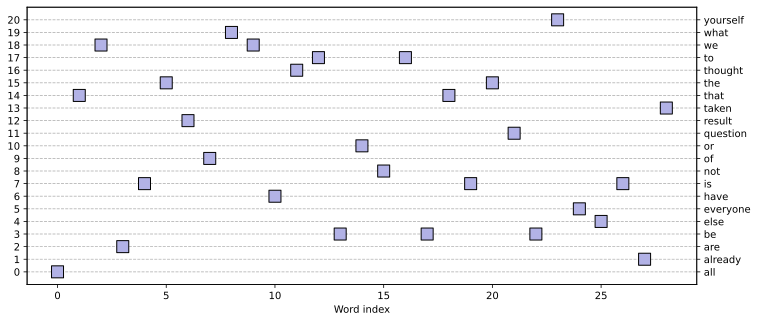
What are we looking at? Each block in the heat map represents a word. The color corresponds to the word's index in our vocabulary. This is the first step toward understanding how models "see" sentences as mathematical patterns.
🧠 Reflection
Try encoding a sentence with a word that isn't in your vocabulary. What happens?
- Error? Most likely.
- Solution? In real systems, we add a special
<UNK>(Unknown) token to handle words that weren't seen during training.
In the next module, we'll dive into Subword Tokenization to solve the vocabulary explosion and unknown word problems permanently.