 ++++
++++Data Science
May 2026×Notebook lesson
Notebook converted from Jupyter for blog publishing.
01-Text-Classification

Driptanil DattaSoftware Developer
NLP and Supervised Learning
Classification of Text Data
The Data
Source: https://www.kaggle.com/crowdflower/twitter-airline-sentiment?select=Tweets.csv (opens in a new tab)
This data originally came from Crowdflower's Data for Everyone library.
As the original source says,
A sentiment analysis job about the problems of each major U.S. airline. Twitter data was scraped from February of 2015 and contributors were asked to first classify positive, negative, and neutral tweets, followed by categorizing negative reasons (such as "late flight" or "rude service").
The Goal: Create a Machine Learning Algorithm that can predict if a tweet is positive, neutral, or negative. In the future we could use such an algorithm to automatically read and flag tweets for an airline for a customer service agent to reach out to contact.
import pandas as pd
import seaborn as sns
import matplotlib.pyplot as plt
df = pd.read_csv("../DATA/airline_tweets.csv")df.head()HTML
MORE
tweet_id
airline_sentiment
airline_sentiment_confidence
negativereason
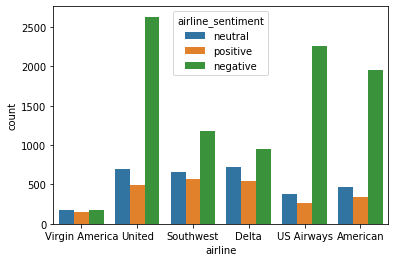
negativereason_confidencesns.countplot(data=df,x='airline',hue='airline_sentiment')RESULT
<AxesSubplot:xlabel='airline', ylabel='count'>PLOT
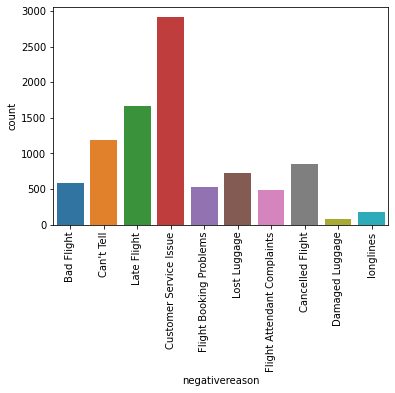
sns.countplot(data=df,x='negativereason')
plt.xticks(rotation=90);
PLOT
sns.countplot(data=df,x='airline_sentiment')RESULT
<AxesSubplot:xlabel='airline_sentiment', ylabel='count'>PLOT
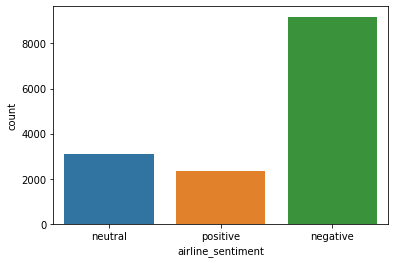
df['airline_sentiment'].value_counts()RESULT
negative    9178
neutral     3099
positive    2363
Name: airline_sentiment, dtype: int64
Features and Label
data = df[['airline_sentiment','text']]data.head()HTML
MORE
airline_sentiment
text
0
neutral
@VirginAmerica What @dhepburn said.
y = df['airline_sentiment']
X = df['text']Train Test Split
from sklearn.model_selection import train_test_splitX_train, X_test, y_train, y_test = train_test_split(X, y, test_size=0.2, random_state=101)Vectorization
from sklearn.feature_extraction.text import TfidfVectorizertfidf = TfidfVectorizer(stop_words='english')tfidf.fit(X_train)RESULT
TfidfVectorizer(stop_words='english')X_train_tfidf = tfidf.transform(X_train)
X_test_tfidf = tfidf.transform(X_test)X_train_tfidfRESULT
<11712x12971 sparse matrix of type '<class 'numpy.float64'>'
	with 107073 stored elements in Compressed Sparse Row format>
DO NOT USE .todense() for such a large sparse matrix!!!
Model Comparisons - Naive Bayes,LogisticRegression, LinearSVC
from sklearn.naive_bayes import MultinomialNB
nb = MultinomialNB()
nb.fit(X_train_tfidf,y_train)
RESULT
MultinomialNB()from sklearn.linear_model import LogisticRegression
log = LogisticRegression(max_iter=1000)
log.fit(X_train_tfidf,y_train)RESULT
LogisticRegression(max_iter=1000)from sklearn.svm import LinearSVC
svc = LinearSVC()
svc.fit(X_train_tfidf,y_train)RESULT
LinearSVC()Performance Evaluation
from sklearn.metrics import plot_confusion_matrix,classification_reportdef report(model):
preds = model.predict(X_test_tfidf)
print(classification_report(y_test,preds))
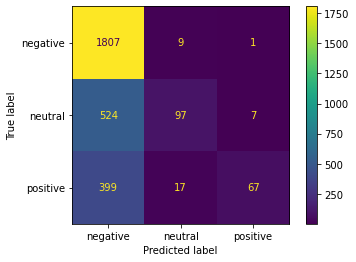
plot_confusion_matrix(model,X_test_tfidf,y_test)print("NB MODEL")
report(nb)STDOUT
MORE
NB MODEL
              precision    recall  f1-score   support

    negative       0.66      0.99      0.79      1817
     neutral       0.79      0.15      0.26       628
PLOT
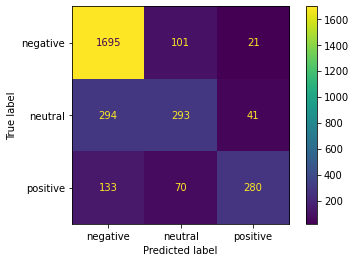
print("Logistic Regression")
report(log)
STDOUT
MORE
Logistic Regression
              precision    recall  f1-score   support

    negative       0.80      0.93      0.86      1817
     neutral       0.63      0.47      0.54       628
PLOT
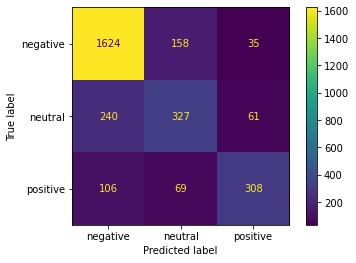
print('SVC')
report(svc)
STDOUT
MORE
SVC
              precision    recall  f1-score   support

    negative       0.82      0.89      0.86      1817
     neutral       0.59      0.52      0.55       628
PLOT
Finalizing a PipeLine for Deployment on New Tweets
If we were satisfied with a model's performance, we should set up a pipeline that can take in a tweet directly.
from sklearn.pipeline import Pipelinepipe = Pipeline([('tfidf',TfidfVectorizer()),('svc',LinearSVC())])pipe.fit(df['text'],df['airline_sentiment'])RESULT
Pipeline(steps=[('tfidf', TfidfVectorizer()), ('svc', LinearSVC())])new_tweet = ['good flight']
pipe.predict(new_tweet)RESULT
array(['positive'], dtype=object)new_tweet = ['bad flight']
pipe.predict(new_tweet)RESULT
array(['negative'], dtype=object)new_tweet = ['ok flight']
pipe.predict(new_tweet)RESULT
array(['neutral'], dtype=object)