 ++++
++++How do modern transformer models like GPT-2 and BERT transform raw text into latent vectors? We explore the transition from one-hot encoding to rich, high-dimensional embeddings.
GPT-2 vs. BERT: Embedding Strategies 🧠

At the heart of every Transformer model is an embedding layer—a lookup table that maps discrete tokens to continuous, high-dimensional vectors. In this lesson, we compare the embedding architectures of GPT-2 and BERT to understand how they represent language in latent space.
This content is adapted from A deep understanding of AI language model mechanisms. It has been curated and organized for educational purposes on this portfolio. No copyright infringement is intended.
🚀 The Core Concept
Modern embeddings are dense representations that capture semantic meaning through geometry:
- Dense vs. Sparse: Unlike one-hot encoding (where most values are zero), embeddings use every dimension to pack information efficiently.
- Latent Space: Words are mapped to a 768-dimensional space where distance (e.g., Euclidean or Cosine) correlates with semantic similarity.
- Model-Specific Signatures: Even for the same word (like "the"), GPT-2 and BERT develop entirely different vector signatures because they are trained with different objectives (next-token prediction vs. masked language modeling).
1. Environment Setup
We'll use numpy and matplotlib for analysis, alongside the transformers library to load the actual model weights.
import numpy as np
import matplotlib.pyplot as plt
from matplotlib.gridspec import GridSpec

# higher-res plots
import matplotlib_inline.backend_inline
matplotlib_inline.backend_inline.set_matplotlib_formats('svg')
2. Loading GPT-2 and BERT
We'll load the base versions of both models. Notice that GPT-2 uses Byte-Pair Encoding (BPE) while BERT uses WordPiece, leading to different vocabulary structures.
from transformers import GPT2Model,GPT2Tokenizer
gpt2 = GPT2Model.from_pretrained('gpt2')
tokenizerG = GPT2Tokenizer.from_pretrained('gpt2')

from transformers import BertTokenizer, BertModel
tokenizerB = BertTokenizer.from_pretrained('bert-base-uncased')
bert = BertModel.from_pretrained('bert-base-uncased')/Users/drippy/.pyenv/versions/3.12.6/lib/python3.12/site-packages/tqdm/auto.py:21: TqdmWarning: IProgress not found. Please update jupyter and ipywidgets. See https://ipywidgets.readthedocs.io/en/stable/user_install.html
from .autonotebook import tqdm as notebook_tqdm3. Comparing Vocabulary Constraints
BERT has a smaller vocabulary (~30k tokens) compared to GPT-2 (~50k tokens). This affects how rare words are fragmented and how the embedding matrix is sized.
print(f'BERT has {tokenizerB.vocab_size:,} tokens.')
print(f'GPT2 has {tokenizerG.vocab_size:,} tokens.')BERT has 30,522 tokens.
GPT2 has 50,257 tokens.4. Analyzing Token Length Distribution
We can measure the character length of every token in both vocabularies. Interestingly, both models peak at around 4-6 characters per token, reflecting the average length of English subwords.
# GPT: get all individual lengths
token_lengths = np.zeros(tokenizerG.vocab_size,dtype=int)
for idx,word in enumerate( tokenizerG.encoder.keys() ):
  token_lengths[idx] = len(word)

uniqueLengthsG,tokenCountG = np.unique(token_lengths,return_counts=True)

# BERT: get all individual lengths
token_lengths = np.zeros(tokenizerB.vocab_size,dtype=int)
for idx,word in enumerate( tokenizerB.get_vocab().keys() ):
  token_lengths[idx] = len(word)

uniqueLengthsB,tokenCountB = np.unique(token_lengths,return_counts=True)

# draw the barplot
_,axs = plt.subplots(2,1,figsize=(8,6))
axs[0].bar(uniqueLengthsG,tokenCountG,color='k',edgecolor='gray')
axs[0].set(xlabel='Token length (chars)',ylabel='Token count',title='GPT2 token lengths (clipped at 22)',
           xlim=[0,22])

axs[1].bar(uniqueLengthsB,tokenCountB,color='k',edgecolor='gray')
axs[1].set(xlabel='Token length (chars)',ylabel='Token count',title='BERT token lengths',
           xlim=[0,22])

plt.tight_layout()
plt.show()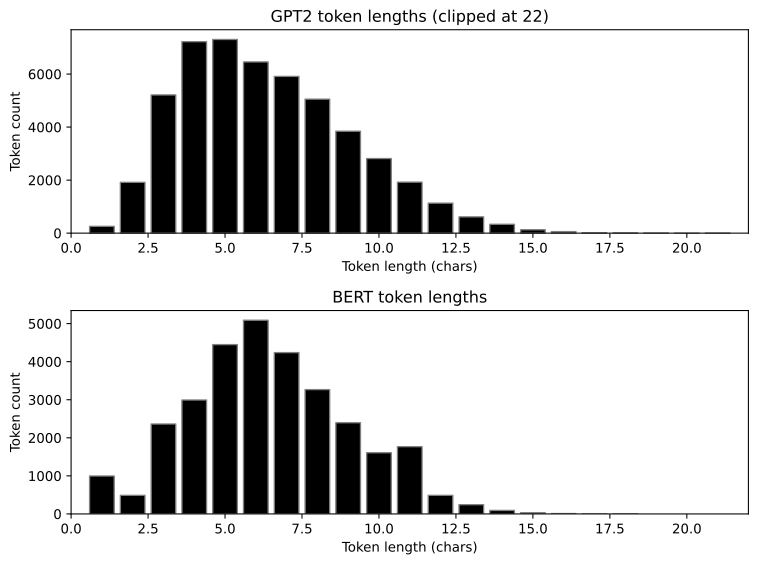
5. Extracting the Weights
The embedding weights are stored in the model's parameters. For both gpt2 and bert-base-uncased, each token is mapped to a 768-dimensional vector.
# get the Word Token Embeddings (WTE) matrix
embeddingsG = gpt2.wte.weight.detach().numpy()

# BERT uses a nested attribute structure
embeddingsB = bert.embeddings.word_embeddings.weight.detach().numpy()

print(f'BERT embedding matrix is of size {embeddingsB.shape}.')
print(f'GPT2 embedding matrix is of size {embeddingsG.shape}.')BERT embedding matrix is of size (30522, 768).
GPT2 embedding matrix is of size (50257, 768).6. Visualizing the Embedding Space
By treating the matrices as images, we can see the range and distribution of values. GPT-2 and BERT both keep their embedding weights within a small range (typically -0.1 to 0.1) to ensure training stability.
fig,axs = plt.subplots(2,1,figsize=(10,8))

# GPT embeddings
h = axs[0].imshow(embeddingsG.T,aspect='auto',vmin=-.15,vmax=.15)
axs[0].set(xlabel='Tokens',ylabel='Dimensions',title='GPT-2 embeddings matrix')
fig.colorbar(h,ax=axs[0],pad=.01)

# BERT embeddings
h = axs[1].imshow(embeddingsB.T,aspect='auto',vmin=-.15,vmax=.15)
axs[1].set(xlabel='Tokens',ylabel='Dimensions',title='BERT embedding matrix')
fig.colorbar(h,ax=axs[1],pad=.01)

plt.tight_layout()
plt.show()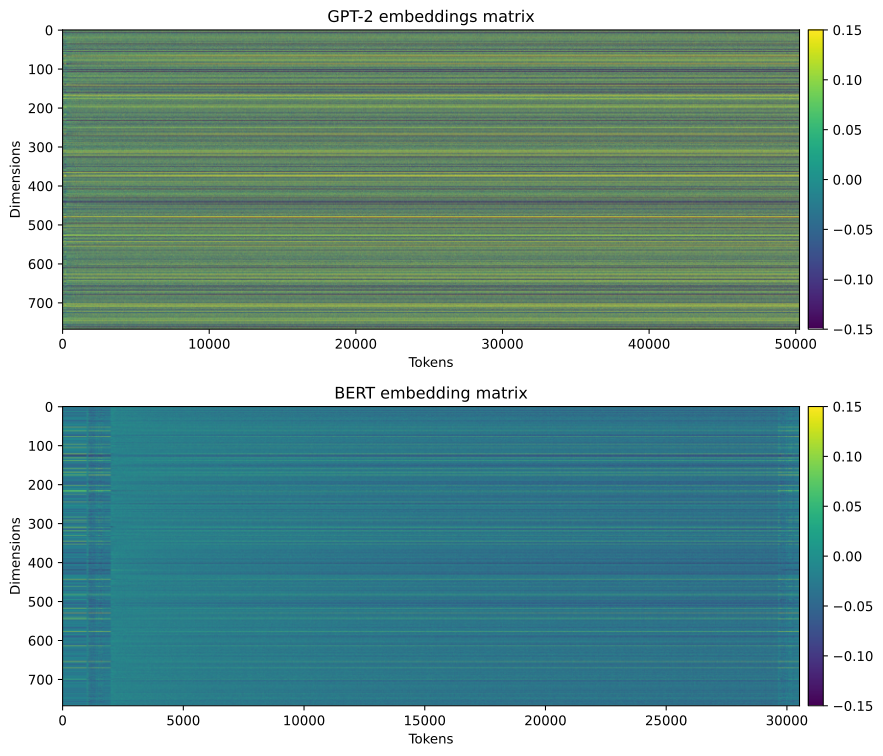
7. Incompatibility: Same Index, Different Word
If we pick a random index (e.g., 15000) and compare the vectors from both models, there is zero correlation. This is because token 15000 in BERT is a completely different word than token 15000 in GPT-2.
# pick a random token index
ridx = np.random.randint(10000,20000)

_,axs = plt.subplots(1,2,figsize=(12,4))

axs[0].plot(embeddingsB[ridx,:],label='BERT',linewidth=.5)
axs[0].plot(embeddingsG[ridx,:],label='GPT2',linewidth=.5)
axs[0].legend()
axs[0].set(xlabel='Embeddings dimension',ylabel='Embedding value',xlim=[0,embeddingsB.shape[1]],title=f'Token {ridx}')

# Scatter plot comparison
axs[1].plot(embeddingsB[ridx,:],embeddingsG[ridx,:],'s',markerfacecolor=[.7,.9,.7])
axs[1].set(xlabel=f'BERT ("{tokenizerB.decode(ridx)}")',ylabel=f'GPT2 ("{tokenizerG.decode(ridx)}")',
           title='Embedding comparison (Zero Correlation)')

plt.show()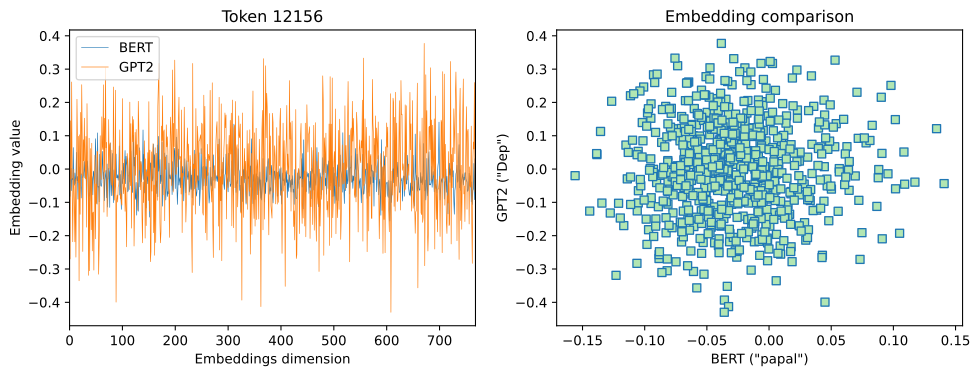
8. The Word "The": Cross-Model Correlation
What happens if we look at the same word across both models? Even though the vectors are learned independently, there is often a weak but positive correlation (e.g., ) because both models are trying to capture the same underlying linguistic properties in a similar 768-dimensional space.
# how about the same word?
token = 'the'
token_idxB = tokenizerB.encode(token)[1] # skip [CLS]
token_idxG = tokenizerG.encode(token)[0]

print(f'BERT: "{token}" is index {token_idxB}')
print(f'GPT2: "{token}" is index {token_idxG}')

# their correlation
corr = np.corrcoef(embeddingsB[token_idxB,:],embeddingsG[token_idxG,:])

plt.plot(embeddingsB[token_idxB,:],embeddingsG[token_idxG,:],'s',markerfacecolor=[.7,.9,.9])
plt.gca().set(xlabel=f'BERT ("{tokenizerB.decode(token_idxB)}")',ylabel=f'GPT2 ("{tokenizerG.decode(token_idxG)}")',
           title=f'Embedding comparison (r = {corr[0,1]:.2f})')

plt.show()BERT: "the" is index 1996
GPT2: "the" is index 1169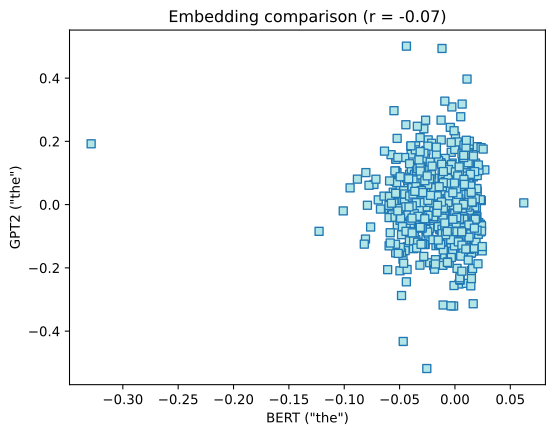
9. Variance and Mean Distributions
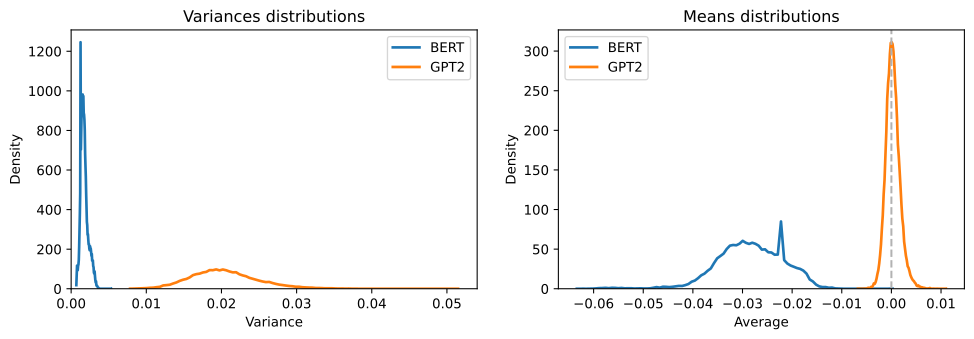
Finally, we analyze the overall statistics of the embedding matrices. GPT-2 tends to have a slightly higher variance in its embedding values compared to BERT, which may reflect differences in the LayerNorm strategies and weight initializations used during training.
_,axs = plt.subplots(1,2,figsize=(12,3.5))

# compare the embeddings variances
yB,xB = np.histogram(embeddingsB.var(axis=1),bins=100,density=True)
yG,xG = np.histogram(embeddingsG.var(axis=1),bins=100,density=True)

axs[0].plot(xB[:-1],yB,linewidth=2,label='BERT')
axs[0].plot(xG[:-1],yG,linewidth=2,label='GPT2')
axs[0].set(xlabel='Variance',ylabel='Density',xlim=[0,None],ylim=[0,None],title='Variances distributions')
axs[0].legend()

# compare the embeddings means
yB,xB = np.histogram(embeddingsB.mean(axis=1),bins=100,density=True)
yG,xG = np.histogram(embeddingsG.mean(axis=1),bins=100,density=True)

axs[1].plot(xB[:-1],yB,linewidth=2,label='BERT')
axs[1].plot(xG[:-1],yG,linewidth=2,label='GPT2')
axs[1].axvline(0,color=[.7,.7,.7],linestyle='--')
axs[1].set(xlabel='Average',ylabel='Density',ylim=[0,None],title='Means distributions')
axs[1].legend()

plt.show()