 ++++
++++Notebook converted from Jupyter for blog publishing.
01-NumPy-Indexing-and-Selection

NumPy Indexing and Selection
In this lecture we will discuss how to select elements or groups of elements from an array.
import numpy as np#Creating sample array
arr = np.arange(0,11)#Show
arrarray([ 0, 1, 2, 3, 4, 5, 6, 7, 8, 9, 10])Bracket Indexing and Selection
The simplest way to pick one or some elements of an array looks very similar to python lists:
#Get a value at an index
arr[8]8#Get values in a range
arr[1:5]array([1, 2, 3, 4])#Get values in a range
arr[0:5]array([0, 1, 2, 3, 4])Broadcasting
NumPy arrays differ from normal Python lists because of their ability to broadcast. With lists, you can only reassign parts of a list with new parts of the same size and shape. That is, if you wanted to replace the first 5 elements in a list with a new value, you would have to pass in a new 5 element list. With NumPy arrays, you can broadcast a single value across a larger set of values:
#Setting a value with index range (Broadcasting)
arr[0:5]=100
#Show
arrarray([100, 100, 100, 100, 100, 5, 6, 7, 8, 9, 10])# Reset array, we'll see why I had to reset in a moment
arr = np.arange(0,11)
#Show
arrarray([ 0, 1, 2, 3, 4, 5, 6, 7, 8, 9, 10])#Important notes on Slices
slice_of_arr = arr[0:6]
#Show slice
slice_of_arrarray([0, 1, 2, 3, 4, 5])#Change Slice
slice_of_arr[:]=99
#Show Slice again
slice_of_arrarray([99, 99, 99, 99, 99, 99])Now note the changes also occur in our original array!
arrarray([99, 99, 99, 99, 99, 99, 6, 7, 8, 9, 10])Data is not copied, it's a view of the original array! This avoids memory problems!
#To get a copy, need to be explicit
arr_copy = arr.copy()

arr_copyarray([99, 99, 99, 99, 99, 99, 6, 7, 8, 9, 10])Indexing a 2D array (matrices)
The general format is arr_2d[row][col] or arr_2d[row,col]. I recommend using the comma notation for clarity.
arr_2d = np.array(([5,10,15],[20,25,30],[35,40,45]))

#Show
arr_2darray([[ 5, 10, 15],
[20, 25, 30],
[35, 40, 45]])#Indexing row
arr_2d[1]array([20, 25, 30])# Format is arr_2d[row][col] or arr_2d[row,col]
# Getting individual element value
arr_2d[1][0]20# Getting individual element value
arr_2d[1,0]20# 2D array slicing
#Shape (2,2) from top right corner
arr_2d[:2,1:]array([[10, 15],
[25, 30]])#Shape bottom row
arr_2d[2]array([35, 40, 45])#Shape bottom row
arr_2d[2,:]array([35, 40, 45])More Indexing Help
Indexing a 2D matrix can be a bit confusing at first, especially when you start to add in step size. Try google image searching NumPy indexing to find useful images, like this one:
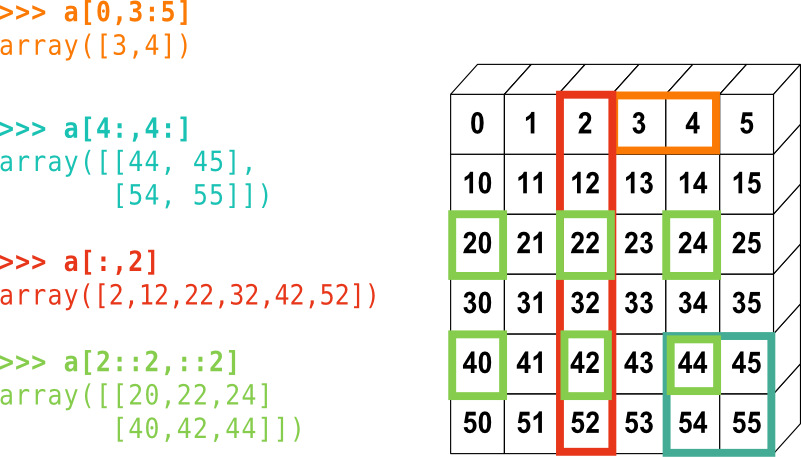 Image source: http://www.scipy-lectures.org/intro/numpy/numpy.html (opens in a new tab)
Conditional Selection
This is a very fundamental concept that will directly translate to pandas later on, make sure you understand this part!
Let's briefly go over how to use brackets for selection based off of comparison operators.
arr = np.arange(1,11)
arrarray([ 1, 2, 3, 4, 5, 6, 7, 8, 9, 10])arr > 4array([False, False, False, False, True, True, True, True, True,
True])bool_arr = arr>4bool_arrarray([False, False, False, False, True, True, True, True, True,
True])arr[bool_arr]array([ 5, 6, 7, 8, 9, 10])arr[arr>2]array([ 3, 4, 5, 6, 7, 8, 9, 10])x = 2
arr[arr>x]array([ 3, 4, 5, 6, 7, 8, 9, 10])