 ++++
++++<Highlight>Global Vectors</Highlight> for Word Representation (GloVe) combines the best of global statistics and local context to create powerful, semantically rich word embeddings.
GloVe Embeddings 🧤

GloVe (Global Vectors) is an unsupervised learning algorithm for . It differs from methods like Word2Vec by explicitly leveraging the global co-occurrence statistics of a corpus, rather than just local context windows.
This content is adapted from A deep understanding of AI language model mechanisms. It has been curated and organized for educational purposes on this portfolio. No copyright infringement is intended.
🚀 The Core Concept
GloVe works on the insight that the ratio of word-word co-occurrence probabilities contains significant semantic information.
- Global Co-occurrence: It builds a massive matrix of how often every word appears near every other word in the entire dataset (e.g., Wikipedia).
- Matrix Factorization: It simplifies this (e.g., 50 or 300 dimensions).
- Linear Relationships: The resulting vectors maintain powerful linear relationships, allowing for famous analogies like King - Man + Woman = Queen.
1. Loading a GloVe Model
We'll use a pre-trained small GloVe model (50 dimensions) trained on Wikipedia and Gigaword data. This model is lightweight and perfect for exploration.
# download a small GloVe model (Wikipedia + Gigaword, 50D)

# NOTE: If you get errors importing, run the following !pip... line,
# then restart your session (from Runtime menu) and comment out the pip line.
# !pip install gensim

import gensim.downloader as api
glove = api.load('glove-wiki-gigaword-50')
2. Environment Setup
We'll use standard data science tools: numpy for matrix operations, scipy for statistics, and matplotlib/seaborn for visualization.
import numpy as np
import scipy
import matplotlib.pyplot as plt
from matplotlib.gridspec import GridSpec

# svg plots
# import matplotlib_inline.backend_inline
# matplotlib_inline.backend_inline.set_matplotlib_formats('svg')
3. Inspecting the Model Properties
Let's see what's inside the glove object provided by the gensim library.
# check the properties and methods
dir(glove)['__class__',
'__contains__',
'__delattr__',
'__dict__',
'__dir__',4. Exploring the Vocabulary
Our model . The most frequent tokens are common English words and punctuation.
print(f'The dictionary contains {len( glove.key_to_index.keys())} items.' )
list(glove.key_to_index.keys())[:50]The dictionary contains 400000 items.['the',
',',
'.',
'of',
'to',5. Random Word Samples
To get a sense of the diversity, let's pull 10 random words from the vocabulary.
# print 10 words at random
for idx in np.random.randint(0,len(glove.key_to_index),10):
print(f'Index {idx:>6} is "{glove.index_to_key[idx]}"')Index 277473 is "posillipo"
Index 174657 is "fujikura"
Index 377518 is "ex-guitarist"
Index 41190 is "u-boats"
Index 140299 is "jota"6. Distribution of Word Lengths
Most words in English are relatively short. We can visualize the distribution of character lengths across the entire 400k vocabulary.
# distribution of token character lengths
token_lengths = np.zeros(len( glove.key_to_index.keys()),dtype=int)
for idx,word in enumerate( glove.key_to_index.keys() ):
  token_lengths[idx] = len(word)

# counts for the bar plot
uniqVals,uniqCounts = np.unique(token_lengths,return_counts=True)


# visualize the distribution of lengths
plt.figure(figsize=(12,4))
plt.bar(uniqVals,np.log(uniqCounts),width=uniqVals[1]-uniqVals[0],facecolor=[.9,.7,.9],edgecolor='k')
plt.gca().set(xlabel='Word length (num characters)',ylabel='Count')

plt.show()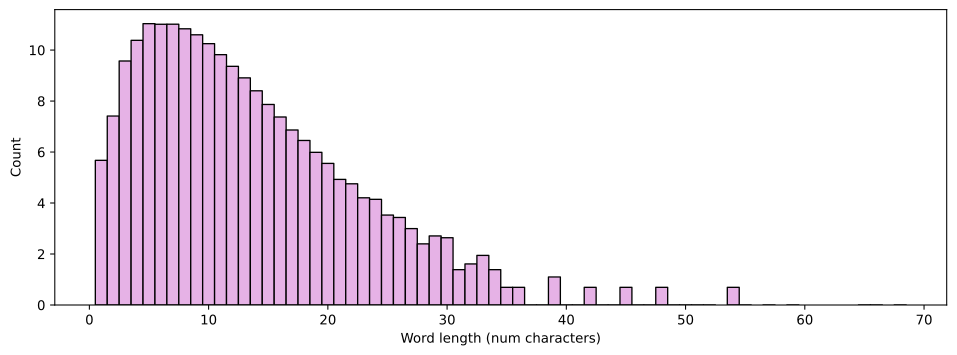
7. The Embeddings Matrix
The core of the model is a massive matrix. Every word is represented by a single row (vector) in this matrix.
# size of the embeddings matrix
print(f'The embeddings matrix is {glove.vectors.shape}')

print(f'The word "apple" has index #{glove.key_to_index["apple"]}')

# can also access it this way:
glove.get_index('apple')The embeddings matrix is (400000, 50)
The word "apple" has index #329232928. Visualizing the Matrix
Visualizing the transposed matrix gives us a global view of the vector values across all dimensions and indices.
plt.figure(figsize=(12,4))
plt.imshow(glove.vectors.T,vmin=-1,vmax=1,aspect='auto')
plt.gca().set(ylabel='Dimension',xlabel='Word index',title='Embeddings matrix')
plt.colorbar(pad=.01)
plt.show()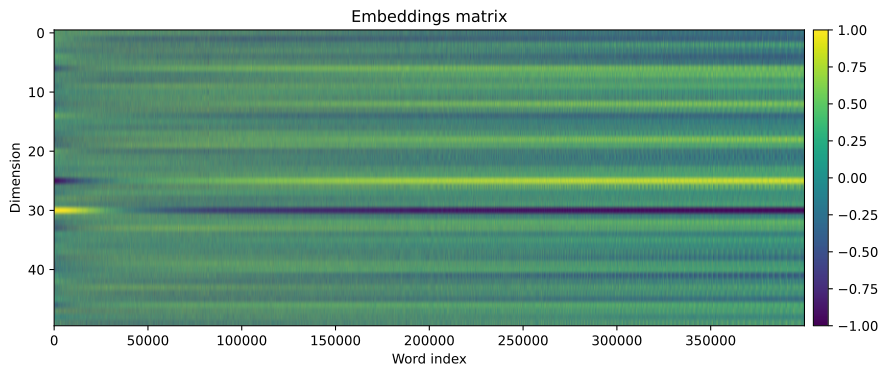
9. Statistical Distribution
We can use a joint plot to see the relationship between the mean and standard deviation of values across the embedding dimensions.
# mean and std across each embedding dim
emb_mean = glove.vectors.mean(axis=1)
emb_std  = glove.vectors.std(axis=1)


# seaborn has nice visualization routines
import seaborn as sns
import pandas as pd # though seaborn only works on pandas dataframes :/

df = pd.DataFrame(np.vstack((emb_mean,emb_std)).T,columns=['Mean','std'])

sns.jointplot(x='Mean',y='std',data=df,alpha=.2)
plt.show()
10. Individual Word Vectors
Let's zoom in on a single word, "banana", and look at its 50-dimensional vector representation.
# pick a word
word = 'banana'

# get its index in the embeddings matrix
wordidx = glove.key_to_index[word]

# get the embedding vector
thisWordVector = glove.vectors[wordidx,:]

# inspect the vector
print(f'The embedding vector for "{word}" is\n {thisWordVector}')The embedding vector for "banana" is
[-0.25522 -0.75249 -0.86655 1.1197 0.12887 1.0121 -0.57249
-0.36224 0.44341 -0.12211 0.073524 0.21387 0.96744 -0.068611
0.51452 -0.053425 -0.21966 0.23012 1.043 -0.77016 -0.16753
-1.0952 0.24837 0.20019 -0.40866 -0.48037 0.10674 0.531611. Plotting a Word Profile
By plotting the vector values, we can see the "fingerprint" of a word in the embedding space.
# visualize it
plt.figure(figsize=(10,4))
plt.plot(glove.vectors[wordidx,:],'ks',markersize=10,markerfacecolor=[.7,.7,.9])

plt.xlabel('Dimension')
plt.title(f'Embedding vector for "{word}"')
plt.show()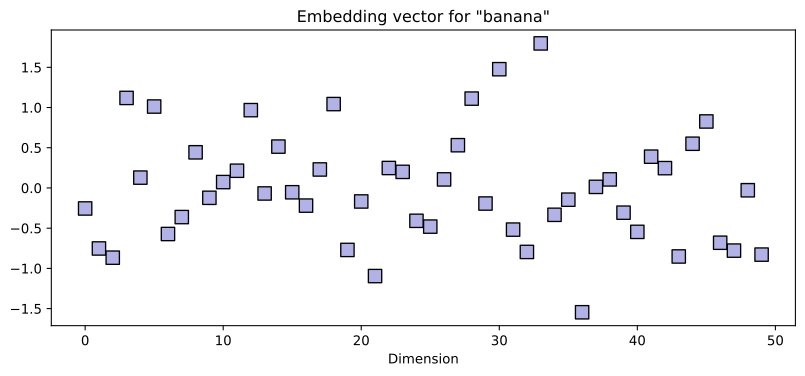
12. Measuring Semantic Similarity
The power of embeddings lies in their geometry. Words with similar meanings (like "banana" and "apple") will have similar vector profiles and a high Cosine Similarity score compared to unrelated words (like "cosmic").
# pick three words
word1 = 'banana'
word2 = 'apple'
word3 = 'cosmic'


# setup the figure subplot geometry
fig = plt.figure(figsize=(10,7))
gs = GridSpec(2,2)
ax0 = fig.add_subplot(gs[0,:])
ax1 = fig.add_subplot(gs[1,0])
ax2 = fig.add_subplot(gs[1,1])

# plot the embeddings by dimension
for idx,word in enumerate([word1,word2,word3]):
  ax0.plot(glove[word],'s-',label=word)

ax0.set(xlabel='Dimension',title='Embeddings',xlim=[-1,glove.vectors.shape[1]+1])
ax0.legend()


# plot the embeddings by each other
cossim = glove.similarity(word1,word2)
ax1.plot(glove[word1],glove[word2],'ko',markerfacecolor=[.9,.7,.7])
ax1.set(xlabel=word1,ylabel=word2,title=f'Cosine similarity = {cossim:.3f}')

cossim = glove.similarity(word1,word3)
ax2.plot(glove[word1],glove[word3],'ko',markerfacecolor=[.7,.9,.7])
ax2.set(xlabel=word1,ylabel=word3,title=f'Cosine similarity = {cossim:.3f}')

# final touches
plt.tight_layout()
plt.show()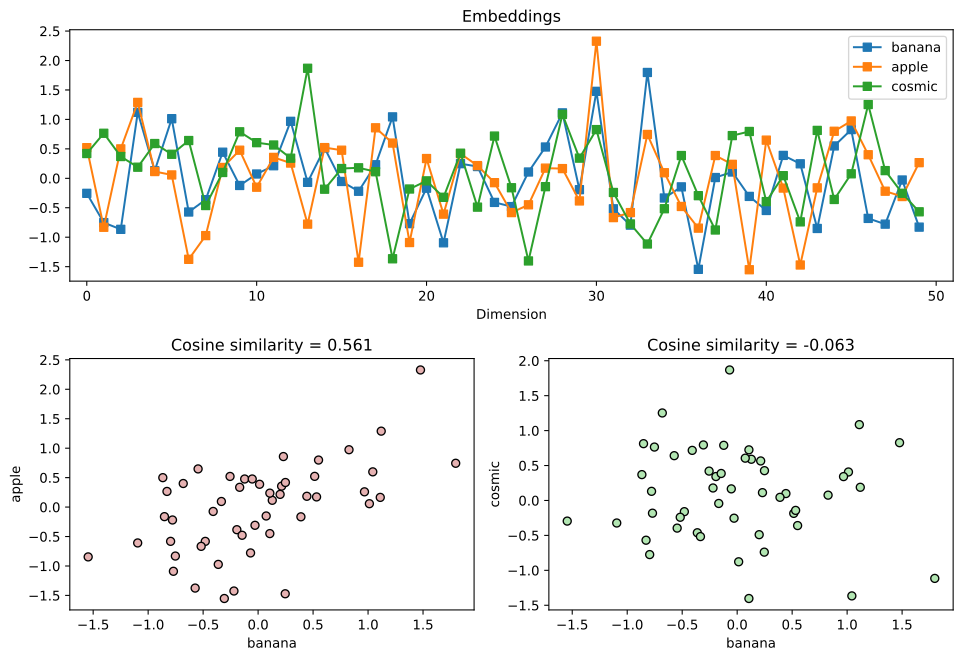
13. Word Analogies and Anomalies
GloVe allows us to perform sophisticated semantic queries, such as finding the most similar words or identifying which word doesn't fit in a list.
# most similar words ("similar" is high cosine similarity)
glove.most_similar('fashion',topn=9)[('style', 0.760734498500824),
('fashions', 0.7528777122497559),
('designer', 0.7515820860862732),
('chic', 0.7511471509933472),
('designers', 0.7450659275054932),# One these things is not like the others...
lists = [ [ 'apple','banana','pirate','peach' ],
[ 'apple','banana','peach','kiwi','starfruit' ],
[ 'apple','banana','pirate','peach','kiwi','starfruit' ],
[ 'apple','banana','orange','kiwi' ]
]
for l in lists:
print(f'In the word list {l}:')
print(f' The most similar word is "{glove.most_similar(l,topn=1)[0][0]}"')
print(f' and the non-matching word is "{glove.doesnt_match(l)}"\n')In the word list ['apple', 'banana', 'pirate', 'peach']:
The most similar word is "mango"
and the non-matching word is "pirate"
In the word list ['apple', 'banana', 'peach', 'kiwi', 'starfruit']: