 ++++
++++Master the fundamentals of prompt engineering. Learn how to structure prompts, provide context, and use few-shot demonstrations to get better results from LLMs.
Basics of Prompting

This content is adapted from Prompting Guide: Working with Chat Models. It has been curated and organized for educational purposes on this portfolio. No copyright infringement is intended.
Prompting an LLM
You can achieve a lot with simple prompts, but the quality of results depends on how much information you provide it and how well-crafted the prompt is. A prompt can contain information like the instruction or question you are passing to the model and include other details such as context, inputs, or examples. You can use these elements to instruct the model more effectively to improve the quality of results.
Let's get started by going over a basic example of a simple prompt:
Prompt
The sky isOutput
blue.If you are using the OpenAI Playground or any other LLM playground, you can prompt the model as shown in the following screenshot:
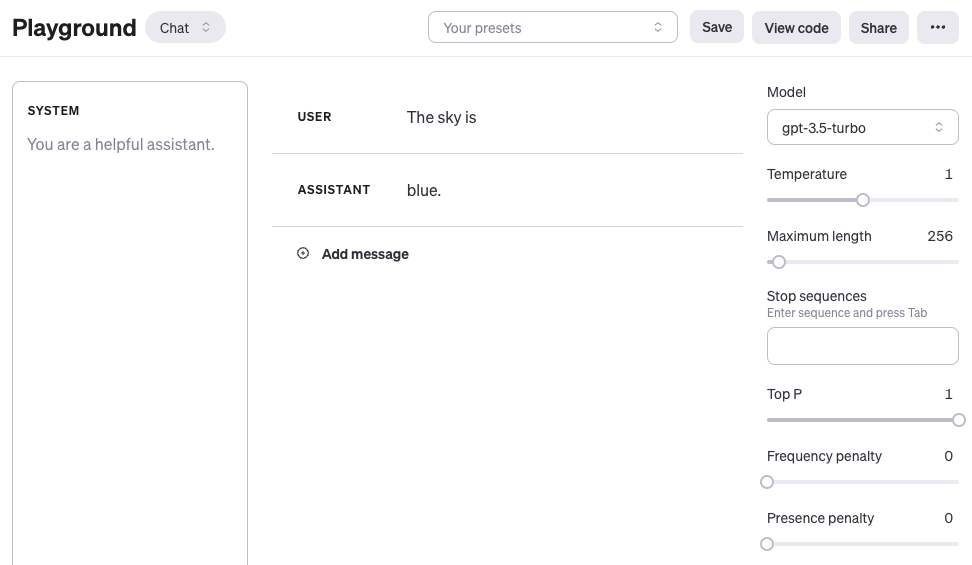
OpenAI Playground Tutorial
For those new to these tools, here is a helpful tutorial on how to get started with the OpenAI Playground:
Working with Chat Models
When using OpenAI chat models like gpt-3.5-turbo or gpt-4, you can structure your prompt using three different roles: system, user, and assistant.
- System message: Not required but (e.g., "You are a helpful translation assistant.").
- User message: The actual instruction or question you are passing to the model.
- Assistant message: The model response. You can also define an assistant message to pass examples of the desired behavior you want.
For simplicity, most examples in this guide will use only the user message to prompt the model.
Improving Prompt Quality
Given the prompt example above, the language model responds with a sequence of tokens that make sense given the context "The sky is". However, the output might be unexpected or far from the task you want to accomplish. This highlights the necessity to provide more context or instructions on what specifically you want to achieve with the system.
Let's try to improve it:
Prompt
Complete the sentence:

The sky is
Output
blue during the day and dark at night.With the prompt above, you are instructing the model to complete the sentence, so the result looks a lot better as it follows exactly what you told it to do ("complete the sentence"). This approach of designing effective prompts is referred to as prompt engineering.
Prompt Formatting
A standard prompt follows a few core patterns, commonly referred to as zero-shot and few-shot prompting.
Zero-Shot Prompting
This is when you or demonstrations. It depends on the model's pre-trained knowledge to understand the task.
Prompt
Q: What is prompt engineering?With more recent models, you can often skip the "Q:" part as it is implied and understood as a question-answering task:
Prompt
What is prompt engineering?Few-Shot Prompting
Few-shot prompting involves to show it how you want it to behave. This enables , where the model learns the task given a few examples.
Prompt
This is awesome! // Positive
This is bad! // Negative
Wow that movie was rad! // Positive
What a horrible show! //
Output
NegativeWe discuss zero-shot and few-shot prompting more extensively in the upcoming sections.