Objectives ✅
- Create multiple Nodes that sequentially process and update different parts of the state.
- Connect Nodes together in a graph.
- Invoke the Graph and see how the state is transformed step-by-step.
from typing import TypedDict
from langgraph.graph import StateGraph

class AgentState(TypedDict):
    name: str
    age: str
    final: str
def first_node(state: AgentState) -> AgentState:
    """This is the first node of our sequence."""
    state['final'] = f'Hi, {state['name']}'

    return state

def second_node(state: AgentState) -> AgentState:
    """This is the second node of our sequence."""
    state['final'] += f'You are {state['age']} years old.'

return stategraph = StateGraph(AgentState)
graph.add_node('first_node', first_node)
graph.add_node('second_node', second_node)
# START
graph.set_entry_point('first_node')
# EDGE
graph.add_edge('first_node', 'second_node')
# END
graph.set_finish_point('second_node')
app = graph.compile()result = app.invoke({"name": "Alice", "age": "30"})
print(result['final'])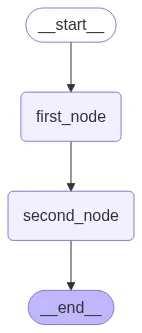
OUTPUT:

'Hi, AliceYou are 30 years old.'