Objectives ✅
- Understand and define the AgentState structure
- Create simple node functions to process and update statte
- Set up a basic LangGraph structure
- Compile and invoke a LangGraph graph
- Understand how data flows through a single-node in LangGraph
from typing import Dict, TypedDict

from langgraph.graph import StateGraphclass AgentState(TypedDict): # Our State Schema
message: str
def greeting_node(state: AgentState) -> AgentState:
'''Simple node that adds a greeting message to the state.'''
state['message'] = "Hey " + state['message'] + ", how is your day going!"
return stategraph = StateGraph(AgentState)
graph.add_node("greeter", greeting_node)
# START
graph.set_entry_point("greeter")
# END
graph.set_finish_point("greeter")
app = graph.compile()result = app.invoke({"message": "Alice"})
result['message']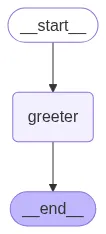
OUTPUT:

'Hey Alice, how is your day going!'