NumPy Operations
Arithmetic
You can easily perform array with array arithmetic, or scalar with array arithmetic. Let's see some examples:
arr = np.arange(0,10)
arrarray([0, 1, 2, 3, 4, 5, 6, 7, 8, 9])arr + arrarr * arrarr - arr# This will raise a Warning on division by zero, but not an error!
# It just fills the spot with nan
arr/arr# Also a warning (but not an error) relating to infinity
1/arrarr**3Universal Array Functions
NumPy comes with many universal array functions, or ufuncs, which are essentially just mathematical operations that can be applied across the array.Let's show some common ones:
# Taking Square Roots
np.sqrt(arr)# Calculating exponential (e^)
np.exp(arr)# Trigonometric Functions like sine
np.sin(arr)# Taking the Natural Logarithm
np.log(arr)Summary Statistics on Arrays
NumPy also offers common summary statistics like sum, mean and max. You would call these as methods on an array.
arr = np.arange(0,10)
arrarr.sum()45arr.mean()4.5arr.max()9arr.min() returns 0 minimum arr.var() returns 8.25 variance arr.std() returns 2.8722813232690143 standard deviation
Axis Logic
When working with 2-dimensional arrays (matrices) we have to consider rows and columns. This becomes very important when we get to the section on pandas. In array terms, axis 0 (zero) is the vertical axis (rows), and axis 1 is the horizonal axis (columns). These values (0,1) correspond to the order in which arr.shape values are returned.
Let's see how this affects our summary statistic calculations from above.
arr_2d = np.array([[1,2,3,4],[5,6,7,8],[9,10,11,12]])
arr_2darray([[ 1, 2, 3, 4],
[ 5, 6, 7, 8],
[ 9, 10, 11, 12]])arr_2d.sum(axis=0)array([15, 18, 21, 24])By passing in axis=0, we're returning an array of sums along the vertical axis, essentially [(1+5+9), (2+6+10), (3+7+11), (4+8+12)]
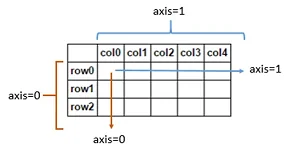
arr_2d.shape(3, 4)This tells us that arr_2d has 3 rows and 4 columns.
In arr_2d.sum(axis=0) above, the first element in each row was summed, then the second element, and so forth.
So what should arr_2d.sum(axis=1) return?
# THINK ABOUT WHAT THIS WILL RETURN BEFORE RUNNING THE CELL!
arr_2d.sum(axis=1)
Great Job!
That's all we need to know for now!